Minecraft: Java Edition 3 on Roblox - Complete Guide
Experience the legendary sandbox game inside Roblox with full crafting, mining, and survival mechanics
Important Notice
Mining & Crafting
Mine resources from dirt to diamond, craft tools, weapons, and build anything you can imagine
Explore Worlds
Discover the Overworld and venture into the Nether with its dangerous terrain and rare resources
VIP Server Saves
Create your own VIP server to save your world progress and play with friends anytime
Regular Updates
New features and improvements added regularly, including the latest Netherite spawning update
What is Minecraft: Java Edition 3?
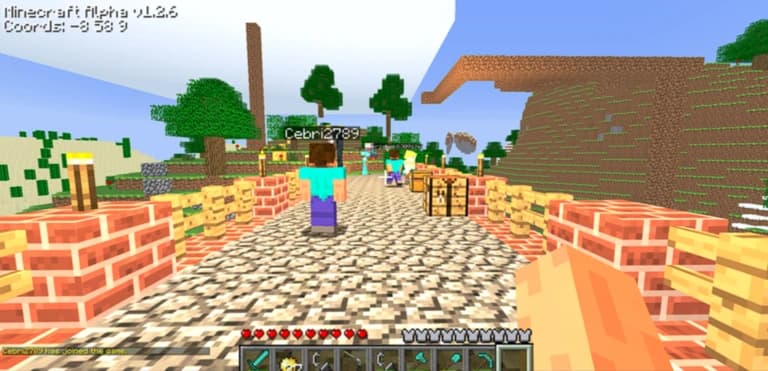
Minecraft: Java Edition 3 is a fan-made recreation of the iconic Minecraft experience built entirely within Roblox. Developed by the Minecraft: Java Edition team, this game brings the beloved sandbox survival mechanics to the Roblox platform, allowing players to mine, craft, build, and explore in a blocky 3D world.
This recreation is particularly impressive because it captures the essence of Minecraft's gameplay while working within Roblox's engine and constraints. With over millions of visits, it has become one of the most popular Minecraft-inspired games on the platform.
Key features include:
- Full crafting system: Create tools, weapons, armor, and building materials using traditional Minecraft recipes
- Mining mechanics: Dig through layers of blocks to find valuable resources like coal, iron, gold, diamond, and Netherite
- The Nether dimension: Build a Nether portal and explore the dangerous lava-filled dimension
- World persistence: VIP servers save your world so you can continue building your creations
- Multiplayer fun: Play with friends and collaborate on massive building projects
- Regular updates: The developers actively update the game with new features and improvements
Latest Update: Netherite now spawns in the Nether at Y-levels 0-30, making it easier to find this powerful endgame material!
Essential Minecraft Tools & Resources
Whether you're playing Minecraft: Java Edition 3 on Roblox or the original Minecraft Java Edition, having the right tools and resources at your disposal can significantly enhance your gaming experience. For players looking to optimize their actual Minecraft gameplay, there are numerous helpful utilities available.
Need Minecraft Tools?
While Minecraft: Java Edition 3 on Roblox captures much of the original game's essence, it's worth noting that the actual Minecraft: Java Edition offers even more depth with features like redstone engineering, command blocks, mods, custom servers, and endless community content. If you enjoy this Roblox version, you'll love the full Minecraft experience!
How to Play Minecraft: Java Edition 3
Getting Started Guide
- 1Join the Game
Click the "Play on Roblox" button above to launch Minecraft: Java Edition 3. Make sure to join the game's group and favorite it to stay updated on new features.
- 2Gather Basic Resources
Start by punching trees to collect wood. This is your most important first resource. Craft a crafting table by placing 4 wood planks in a 2x2 pattern.
- 3Craft Your First Tools
Use your crafting table to create wooden tools: a pickaxe for mining stone, an axe for cutting wood faster, and a sword for defense. These basic tools will help you progress quickly.
- 4Mine for Better Materials
Once you have a pickaxe, mine stone and upgrade to stone tools. Then search for coal and iron underground. Iron tools are much more durable and efficient than wooden or stone tools.
- 5Build Your First Shelter
Before it gets dark, build a simple shelter using blocks. This will protect you and give you a safe place to craft and store resources. Don't forget to craft torches for light!
Essential Crafting Recipes
Here are the most important crafting recipes you'll need to progress in Minecraft: Java Edition 3:
Pro Tips for Success
- ✓Always carry a water bucket - It can save you from lava deaths, help you descend safely, and extinguish fires
- ✓Create multiple sets of tools - Keep backup tools in chests at your base so you're never caught without equipment
- ✓Mark your coordinates - Write down the coordinates of your base, valuable resource locations, and points of interest
- ✓Light up your base and surroundings - Place torches everywhere to prevent mob spawns near your structures
- ✓Farm renewable resources early - Set up tree farms, wheat farms, and animal pens for sustainable resource generation
- ✓Don't dig straight down - This classic mistake can lead to falling into lava or deep caves. Always dig in a staircase pattern
- ✓Join the game's group - Stay updated on new features, bug fixes, and community events by joining the official Roblox group
- ✓Like and favorite the game - Show your support and ensure you can quickly find the game in your favorites list
Minecraft: Java Edition 3 vs Real Minecraft
While Minecraft: Java Edition 3 on Roblox does an excellent job recreating the core Minecraft experience, there are some differences compared to the official Minecraft: Java Edition:
✓What's Similar
- • Core mining and crafting mechanics
- • Building and creative freedom
- • Resource gathering and progression
- • The Nether dimension
- • Diamond and Netherite gear
- • Multiplayer support
- • World persistence (VIP servers)
!Key Differences
- • Limited to Roblox's engine capabilities
- • No redstone mechanics or command blocks
- • Simplified mob AI and behaviors
- • No The End dimension or Ender Dragon
- • Different graphics and physics
- • No mod support or custom servers
- • Smaller world size compared to infinite worlds
Both versions offer unique advantages. Minecraft: Java Edition 3 on Roblox is free to play and accessible through your browser, making it perfect for quick sessions with friends. The official Minecraft: Java Edition offers deeper gameplay, infinite possibilities with mods, and a massive community creating content.
Frequently Asked Questions
Quick Actions
Game Information
Developer
Minecraft: Java Edition
Maturity Rating
Mild • Ages 5+
Genre
Sandbox, Survival, Adventure
Max Players
Multiple (Server Based)
Last Updated
Recently (Netherite Update)
Disclaimer
This guide is for Minecraft: Java Edition 3 on Roblox, which is an unofficial fan recreation. Minecraft® is a trademark of Mojang AB and Microsoft Corporation.